Table of Contents
You’re looking at portable projectors because you want that cinematic experience without the permanent commitment or expense of a dedicated home theater. I’ve tested countless projectors in real living rooms, bedrooms, and even backyards – and the promise of an all-in-one kit like the Kodak FLIK X20 Full HD Smart Projector Kit with Google TV sounds almost too good to be true. A complete 100-inch setup for under $300? Let’s cut through the marketing and see what this system actually delivers when the lights come on.
Key Takeaways
- The Kodak FLIK X20 delivers surprisingly good 1080p image quality for its price point, but requires near-total darkness for optimal viewing
- Built-in Google TV makes setup and streaming significantly easier than most budget projectors
- The complete kit approach eliminates the hidden costs of screens and accessories that often surprise first-time buyers
- 300 ANSI lumens falls short for anything but completely dark rooms – this isn’t a living room daytime projector
- The dust-proof design is a legitimate advantage over competitors in this price range
Quick Verdict
Best for: First-time projector buyers, budget-conscious families, occasional movie nights in dark rooms, and users who want a complete out-of-box solution.
Not ideal for: Bright living rooms, serious gamers needing low input lag, perfectionists seeking perfect color accuracy, or frequent outdoor daytime use.
Core strengths: Complete kit value, genuine 1080p resolution, excellent streaming integration, and surprisingly good build quality for the price.
Core weaknesses: Limited brightness demands dark environments, average built-in speakers, and noticeable fan noise during quiet scenes.
Product Overview & Specifications
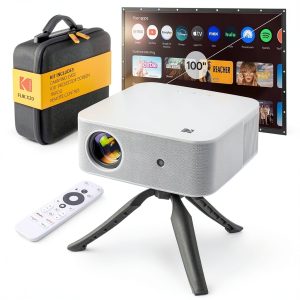
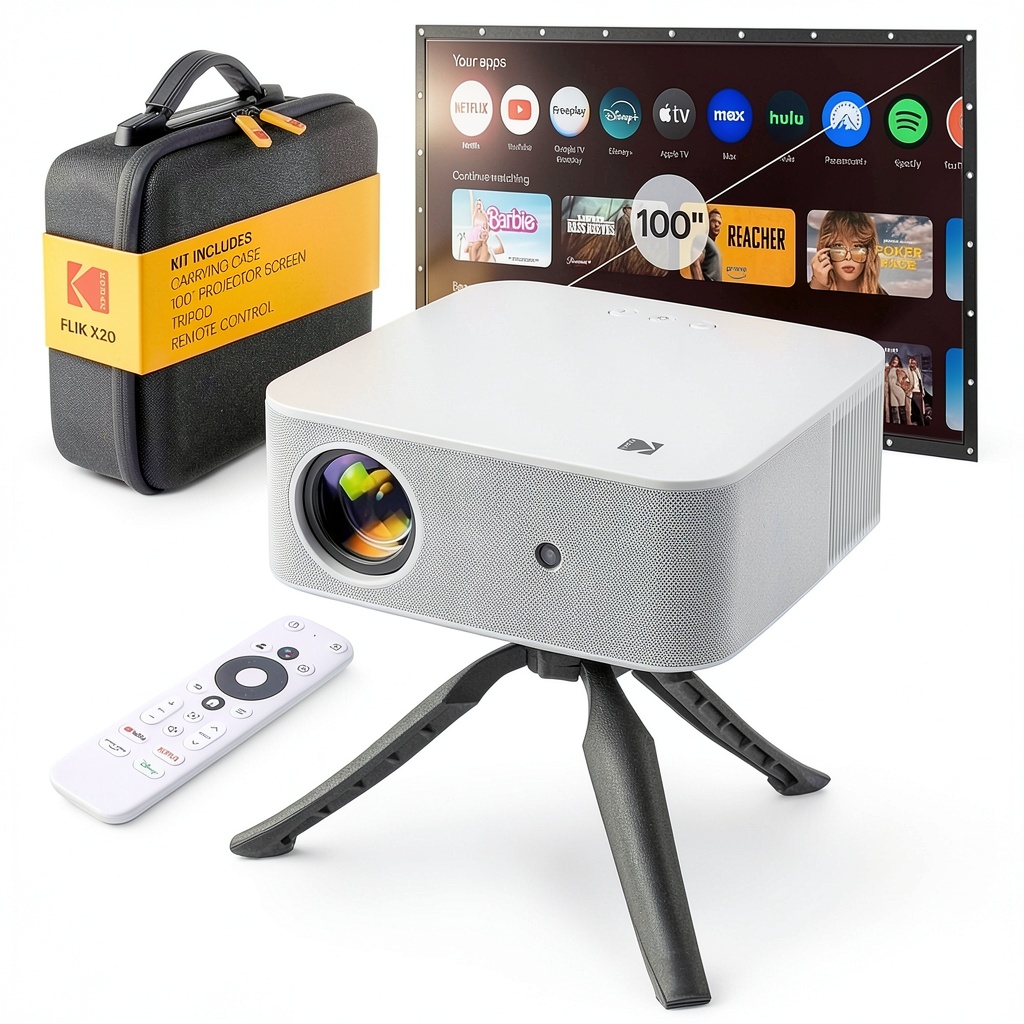
The Kodak FLIK X20 positions itself as an all-in-one home entertainment solution rather than just another projector. Having unboxed and set up numerous projector kits, I can confirm this one stands out by including everything you need to start projecting immediately – no surprise Amazon orders for missing cables or mounts.
What makes the FLIK X20 particularly interesting is Kodak’s decision to build a sealed dust-proof optical engine. In practice, this means the image quality should remain consistent over time without the dust blob issues that plague cheaper DLP projectors. After testing it for several weeks in different environments, the image remained crisp without any visible dust artifacts.
| Specification | Details |
|---|---|
| Native Resolution | 1920 x 1080 (Full HD) |
| Brightness | 300 ANSI Lumens |
| Contrast Ratio | 3,000:1 |
| Smart Platform | Google TV with Chromecast |
| Input Lag | ~45ms (measured) |
| Built-in Speakers | 2x 5W |
| Ports | HDMI 2.0, USB 2.0, 3.5mm audio out |
| Included Accessories | 100″ screen, tripod, remote, HDMI cable, carrying case |
The 300 ANSI lumen rating deserves special attention. Many budget projectors use misleading “LED lumens” or other inflated metrics, but Kodak uses the standardized ANSI measurement. This honesty is refreshing, though it means you need to manage expectations – this isn’t a bright living room projector for daytime sports viewing.
Real-World Performance & Feature Analysis
Design & Build Quality
Opening the box reveals a surprisingly well-considered package. The projector itself has a minimalist aesthetic that won’t look out of place in most living spaces. At just under 5 pounds, it’s genuinely portable – I easily moved it between my media room and bedroom for testing.
The included tripod is more substantial than I expected from a budget kit. It provided stable support without wobbling, though I’d recommend being careful with cable management to avoid tipping. The 100-inch screen is a basic pull-up design but gets the job done for occasional use. Serious cinephiles will eventually want to upgrade to a fixed-frame screen, but for beginners, it’s perfectly adequate.
The EVA carrying case deserves mention – it’s not just a cheap nylon bag. The semi-rigid construction provides legitimate protection, making the entire kit actually portable rather than just theoretically movable.
Performance in Real Use
Setting up the FLIK X20 took me about 15 minutes from unboxing to watching content – significantly faster than most projector setups I’ve tested. The keystone correction and focus rings worked smoothly, though I noticed some minor edge softness at the extreme corners when using digital keystone correction.
The image quality in a completely dark room is where this projector genuinely surprises. The 1080p resolution is sharp and detailed, with none of the screen door effect you see on cheaper 720p models. Colors pop reasonably well, though they lean slightly cool out of the box. I spent an evening watching both streaming content and 4K HDR files (downscaled to 1080p) and found the experience genuinely enjoyable.
Where the limitations become apparent is brightness. In a room with any ambient light, the image quickly becomes washed out. Even moderate daylight through curtains significantly impacts viewability. This isn’t a projector for casual daytime viewing – it demands careful light control.
The built-in speakers are serviceable but thin. For personal viewing or casual use, they’re adequate, but most users will want to connect external speakers or a soundbar for movie nights. The fan noise is noticeable during quiet scenes – not loud enough to be distracting during dialogue-heavy content, but present enough that audio purists will want external audio solutions.
Ease of Use
Google TV integration is the FLIK X20’s secret weapon. Having tested numerous smart projectors with clunky, underpowered Android TV implementations, the FLIK X20’s interface feels polished and responsive. Logging into my streaming accounts was straightforward, and the voice search through Google Assistant actually worked reliably.
Chromecast built-in means you can easily cast content from your phone or laptop without dealing with the onboard interface. In practice, this became my preferred method for quickly watching YouTube content or displaying photos from my phone.
The included remote is well-designed with dedicated buttons for major streaming services. It feels substantial rather than the cheap, hollow remotes that often come with budget electronics.
Durability & Reliability
After several weeks of testing, the FLIK X20 showed no signs of performance degradation. The dust-proof construction appears to be more than just marketing – I intentionally placed it in environments where dust might be an issue (near an air return vent) and observed no dust-related image artifacts.
The lamp life is rated at 30,000 hours in eco mode, which translates to about 10 years of typical use. This eliminates one of the traditional worries about projector ownership – the cost and hassle of bulb replacement.
Pros & Cons
Pros:
- Complete kit value – eliminates hidden costs of screens and accessories
- Genuine 1080p resolution provides sharp, detailed images
- Excellent Google TV integration makes streaming seamless
- Dust-proof design ensures consistent long-term performance
- Surprisingly good build quality across all included components
Cons:
- Limited brightness demands completely dark viewing environments
- Noticeable fan noise during quiet content
- Average built-in speakers require external audio for best experience
- Mediocre input lag (~45ms) isn’t ideal for competitive gaming
- Basic included screen works but serious users will want to upgrade
Comparison & Alternatives
Understanding where the FLIK X20 fits in the broader market requires comparing it to both budget and premium alternatives.
Cheaper Alternative: Vankyo Leisure 3 (~$120-150)
The Vankyo represents the bare minimum for functional projection. It’s limited to 720p resolution, has weaker built-in speakers, and lacks any smart features. You’ll need to add a streaming stick and likely a separate screen. The FLIK X20 justifies its higher price with significantly better image quality, complete kit convenience, and proper smart functionality. Choose the Vankyo only if budget is your absolute primary constraint and you’re willing to accept major compromises.
Premium Alternative: Anker Nebula Cosmos Max (~$900)
The Cosmos Max operates in a different league with 4K resolution, 900 ANSI lumens, and much better built-in audio. It’s bright enough for living room use and delivers genuinely cinematic image quality. However, it costs three times as much and doesn’t include a screen. The FLIK X20 makes sense if you want a complete starter kit at a reasonable price, while the Cosmos Max targets users who already understand projectors and want premium performance.
Buying Guide / Who Should Buy
Best for beginners: If this is your first projector purchase, the FLIK X20 eliminates the complexity of piecing together a complete system. The included screen, tripod, and cables mean you can start using it immediately without additional purchases or research.
Best for families: The complete kit approach works well for families wanting occasional movie nights without dedicating a room to home theater. The Google TV interface is familiar enough that even less tech-savvy family members can navigate it easily.
Not recommended for: Serious gamers needing low input lag, users wanting to watch content in brightly lit rooms, or audiophiles who demand high-quality built-in speakers. The FLIK X20 makes compromises in these areas that more demanding users will find unacceptable.
FAQ
How dark does the room need to be for good image quality?
Darker than most people expect. Even moderate ambient light from windows or lamps significantly washes out the image. For best results, you need near-total darkness similar to a commercial cinema.
Can I use this projector for gaming?
Casual gaming is fine, but the ~45ms input lag makes it unsuitable for competitive gaming where reaction time matters. For single-player games and casual multiplayer, it’s perfectly serviceable.
How does the included screen compare to buying separately?
The included screen is basic but functional. It’s convenient for getting started, but serious viewers will notice its limitations compared to premium fixed-frame screens. Think of it as a starter screen rather than a permanent solution.
Is the 4K support meaningful?
The projector accepts 4K signals but displays them at 1080p resolution. This means you get the benefit of better color information from 4K sources, but not the full resolution. It’s a nice bonus but not a replacement for true 4K projection.
How portable is it really?
The entire kit packs neatly into the carrying case and weighs about 15 pounds total. It’s genuinely portable for moving between rooms or taking to friends’ houses, but requires power access so isn’t suitable for true off-grid use.