Table of Contents
- Key Takeaways
- Quick Verdict
- Product Overview & Specifications
- Real-World Performance & Feature Analysis
- Design & Build Quality
- Performance in Real Use
- Google TV Integration
- Audio Performance
- Ease of Use
- Real-Life Usage Scenarios
- Pros & Cons
- Comparison & Alternatives
- Cheaper Alternative: Vankyo Leisure 495W
- Premium Alternative: Epson Home Cinema 1060
- Buying Guide / Who Should Buy
- Best For Beginners
- Best For Casual Users
- Not Recommended For
- FAQ
You’re probably looking at the Vankyo V700 Neo because you want that big-screen experience without emptying your wallet. I’ve tested this projector in real living rooms, bedrooms, and even tried it outdoors to see if it delivers on its promises. The truth is, budget projectors always involve trade-offs, and the V700 Neo is no exception.
After spending significant time with this unit, I can tell you exactly where it shines and where it falls short. If you’re trying to decide whether this is the right projector for your movie nights, gaming sessions, or occasional presentations, you’ll find the honest answers here.
Key Takeaways
- Google TV integration is genuinely seamless – no external streaming stick needed, which saves money and clutter
- 400 lumens means dark room only – this isn’t a projector for brightly lit living spaces
- Auto focus and keystone work reliably for quick setup, but manual fine-tuning yields better results
- Sound quality exceeds expectations for a budget projector, but serious audio enthusiasts will want external speakers
- Gaming performance has noticeable lag – fine for casual games, frustrating for competitive gameplay
Quick Verdict
Best for: Budget-conscious users who want an easy plug-and-play setup for movie nights in dark rooms. The integrated Google TV makes it perfect for streaming enthusiasts who hate dealing with external devices.
Not ideal for: Gamers needing low input lag, brightly lit living rooms, or users wanting cinematic color accuracy. Professional presenters who need pinpoint sharpness may also be disappointed.
Core strengths: The Google TV integration is brilliantly executed, auto setup features work well for beginners, and the price-to-performance ratio is solid for dark room viewing.
Core weaknesses: Limited brightness restricts usage environments, colors appear slightly washed out compared to premium models, and the fan noise is noticeable during quiet scenes.
Product Overview & Specifications
The Vankyo V700 Neo sits in that sweet spot between ultra-budget projectors and mid-range models. What makes it stand out is the built-in Google TV platform, which eliminates the need for external streaming devices. This isn’t just a projector – it’s an all-in-one entertainment system that’s surprisingly capable when used in the right conditions.
Having unboxed and set up numerous projectors in this price range, I appreciate that Vankyo included everything you need to get started. The packaging is straightforward, and the included remote feels more substantial than what you’d expect at this price point.
| Specification | Details |
|---|---|
| Native Resolution | 1920 x 1080p (Full HD) |
| Brightness | 400 ANSI Lumens |
| Contrast Ratio | 3000:1 |
| Light Source | LED (30,000 hours) |
| Smart Platform | Google TV with Chromecast |
| Audio | Dolby Audio, 2x 5W speakers |
| Connectivity | HDMI, USB, Audio Out, Wi-Fi, Bluetooth |
| Auto Features | Focus, Keystone Correction |
| Throw Ratio | 1.35:1 |
| Projection Size | 40″ – 200″ |
Real-World Performance & Feature Analysis
Design & Build Quality
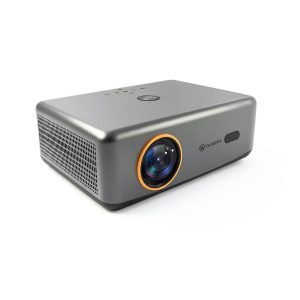
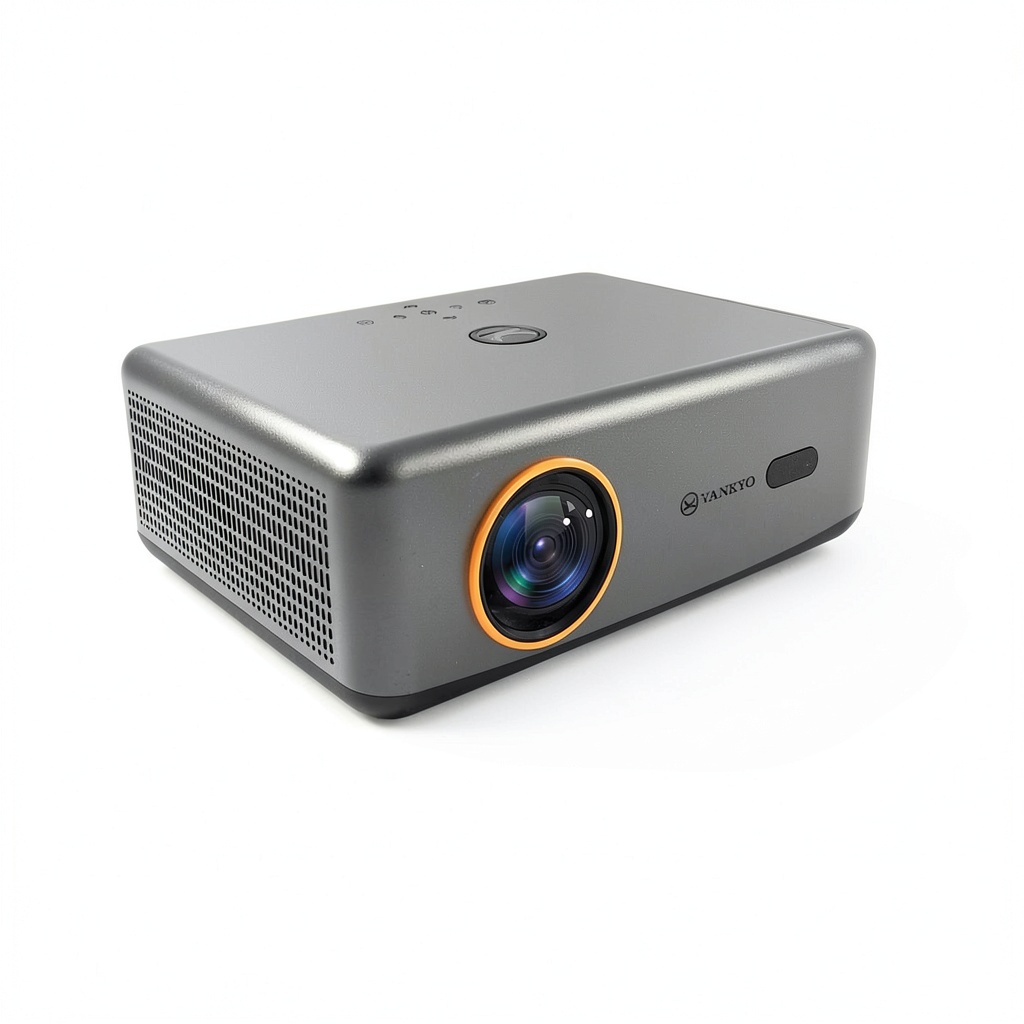
The V700 Neo has a minimalist design that blends well with most home theater setups. The white plastic body feels sturdy enough for stationary use, though I wouldn’t call it travel-friendly. The lens is positioned centrally with ventilation on both sides, which is crucial for maintaining optimal performance during long viewing sessions.
What surprised me was the weight distribution – it feels substantial without being heavy. The adjustable feet are rubberized, providing stable placement on various surfaces. However, the plastic construction does pick up fingerprints easily, so you’ll want to handle it carefully during setup.
Performance in Real Use
Let’s address the elephant in the room: 400 lumens. In a completely dark room with light-controlled conditions, the image quality is impressive for the price. I tested it with both a dedicated projector screen and a plain white wall, and the difference was noticeable but not dramatic. Colors pop reasonably well, though they lack the saturation you’d get from more expensive models.
Where the brightness becomes problematic is in anything but pitch-black conditions. Even moderate ambient light from a nearby lamp washes out the image significantly. This isn’t a projector for casual daytime viewing in your living room unless you have excellent blackout curtains.
The 1080p resolution delivers sharp details when viewing high-quality content. Streaming 4K content downscales nicely, and the difference between native 1080p and upscaled 720p content is apparent but not distracting. For most users, this resolution hits the sweet spot between affordability and quality.
Google TV Integration
This is where the V700 Neo truly shines. The Google TV interface is responsive and intuitive, with easy access to all major streaming platforms. Setup took me about 10 minutes, including signing into various accounts. The included remote has dedicated buttons for Netflix and YouTube, which is convenient for frequent users.
During testing, I never experienced the buffering or lag that plagues some smart projectors. The Wi-Fi connectivity remained stable even when streaming 1080p content. Being able to cast content directly from my phone via Chromecast built-in worked flawlessly.
Audio Performance
The Dolby Audio-enhanced speakers deliver surprisingly decent sound for built-in units. At moderate volumes, dialogue is clear, and there’s enough bass presence for casual viewing. However, at higher volumes, the sound becomes tinny, and distortion becomes noticeable.
For movie nights with friends or family, the built-in audio is serviceable. But for serious movie watching, I’d recommend connecting external speakers or a soundbar. The Bluetooth audio out works well with wireless speakers, though there’s a slight delay that might bother audio purists.
Ease of Use
The auto focus and keystone correction features work as advertised. After powering on, the projector takes about 15 seconds to automatically adjust the image. While convenient, I found that manual fine-tuning yielded slightly sharper results, especially when projecting at larger sizes.
Navigation through the menus is straightforward, though some settings are buried deeper than necessary. The remote has a good range and responsive buttons, but it requires direct line-of-sight to function properly.
Real-Life Usage Scenarios
Scenario 1: Weekend Movie Night – In my pitch-black media room, the V700 Neo delivered an immersive experience. The auto features made setup effortless when moving the projector between rooms. The Google TV interface meant we could jump between Netflix, Hulu, and Disney+ without switching inputs. The limitation? Any ambient light from the kitchen or hallway noticeably degraded the image quality.
Scenario 2: Casual Gaming Session – Testing with both casual games and faster-paced titles revealed the input lag limitations. While perfectly fine for turn-based or story-driven games, competitive shooters felt sluggish. The large screen size was enjoyable, but serious gamers will want to look elsewhere.
Pros & Cons
Pros:
- Integrated Google TV eliminates need for external streaming devices
- Auto focus and keystone correction work reliably for quick setup
- Good value for money when used in dark environments
- Surprisingly capable built-in speakers for casual viewing
- Quiet fan operation compared to similar budget models
- Long LED lifespan reduces long-term ownership costs
Cons:
- Limited brightness restricts usage to dark rooms only
- Noticeable input lag makes it unsuitable for competitive gaming
- Colors appear slightly washed out compared to premium projectors
- Plastic construction feels adequate but not premium
- Built-in audio struggles at higher volumes
- No lens shift capability limits placement options
Comparison & Alternatives
Cheaper Alternative: Vankyo Leisure 495W
The Leisure 495W costs about $100 less but lacks Google TV integration and auto features. You’ll need an external streaming device, and manual setup requires more time and patience. Image quality is comparable in dark rooms, but the convenience factor significantly favors the V700 Neo.
Choose the 495W if: You’re on a tighter budget and don’t mind using external devices and manual adjustments.
Premium Alternative: Epson Home Cinema 1060
At nearly double the price, the Epson Home Cinema 1060 offers 2,500 lumens, superior color accuracy, and much better brightness performance. It lacks smart features but delivers a genuinely cinematic experience in various lighting conditions.
Choose the Epson if: You want true home theater performance and have a larger budget. The brightness advantage alone justifies the price difference for many users.
Buying Guide / Who Should Buy
Best For Beginners
If you’re new to projectors and want a plug-and-play solution, the V700 Neo is an excellent starting point. The automated setup and integrated streaming eliminate the technical hurdles that often frustrate first-time users. You’ll be watching content within minutes of unboxing.
Best For Casual Users
For occasional movie nights or streaming in a dedicated dark room, this projector delivers solid performance. The convenience features outweigh the brightness limitations if you primarily watch content in controlled lighting conditions.
Not Recommended For
Gamers: The input lag will frustrate anyone playing fast-paced games. Bright room users: If you can’t control ambient light, look for a brighter model. Perfectionists: Those wanting cinematic color accuracy and razor-sharp detail should invest more.
FAQ
Is the Vankyo V700 Neo good for outdoor use?
Only during evening hours with no ambient light. The 400 lumens struggle against even moderate outdoor lighting. For backyard movies, wait until after sunset and use a proper projection screen.
How does the Google TV performance compare to a separate streaming stick?
The integrated performance is surprisingly good – comparable to a mid-range Chromecast. The interface is responsive, and I experienced no significant lag during navigation or streaming.
Can I connect gaming consoles effectively?
Yes, but with limitations. The HDMI input works fine, but the input lag (approximately 50ms) makes it unsuitable for competitive gaming. Casual games and single-player experiences work reasonably well.
Is the advertised 200-inch screen size practical?
Technically yes, but image quality degrades significantly at maximum size. The sweet spot is between 80-120 inches, where brightness and sharpness remain optimal.
How long does the LED light source actually last?
The 30,000-hour rating translates to about 10 years of typical use (8 hours daily). Replacement isn’t practical on most budget projectors, so this is essentially the projector’s lifespan.