Table of Contents
- Key Takeaways
- Quick Verdict
- Product Overview & Specifications
- Real-World Performance & Feature Analysis
- Design & Build Quality
- Performance in Real Use
- Ease of Use
- Audio Performance
- Battery Life & Portability
- Pros & Cons
- Comparison & Alternatives
- Cheaper Alternative: Generic Budget Projectors ($50-70)
- Premium Alternative: Anker Nebula Capsule 3 ($300-400)
- Buying Guide / Who Should Buy
- Best for Beginners
- Best for Professionals
- Not Recommended For
- FAQ
You’re searching for a portable projector because you want to transform any space into an entertainment hub—whether that’s your backyard, a hotel room, or your living room. But finding a truly capable projector under $100 that delivers on its promises is surprisingly difficult. After testing the Miroir M200S portable smart HD projector across multiple real-world scenarios, I’ve discovered what this compact device actually delivers, and more importantly, where it falls short.
Key Takeaways
- The M200S delivers surprisingly vibrant colors in dark environments but struggles with brightness in anything but complete darkness
- Wireless screen mirroring works well for casual content but has limitations with DRM-protected streaming services
- The 2-hour battery life is accurate for typical use but requires planning for movie nights
- Built-in speaker is adequate for personal viewing but lacks depth for group settings
- SYNQ TV app provides streaming access but requires separate subscriptions and has interface limitations
Quick Verdict
Best for: Casual users wanting portable movie nights in dark rooms, students needing basic presentations, and travelers who prioritize compact size over premium features.
Not ideal for: Netflix binge-watchers without additional devices, outdoor daytime use, audiophiles, or those expecting true 1080p clarity.
Core strengths: Genuine portability with built-in battery, straightforward setup, decent color reproduction in dark settings, and all-in-one convenience at an accessible price point.
Core weaknesses: Limited brightness output, average built-in sound, streaming app restrictions, and shorter battery life than premium alternatives.
Product Overview & Specifications
The Miroir M200S positions itself as an all-in-one portable entertainment solution that eliminates the cable clutter and power constraints of traditional projectors. Having tested numerous portable projectors in this price range, I can confirm this model stands out for its complete package approach—you get the projector, built-in battery, wireless capabilities, and streaming app all in one compact unit.
What makes the M200S noteworthy isn’t any single standout feature, but rather how it balances multiple functionalities at a consumer-friendly price point. The integrated SYNQ TV platform means you’re not immediately dependent on external devices, while the wireless screen mirroring covers scenarios where the built-in apps fall short.
| Specification | Details |
|---|---|
| Native Resolution | 854 x 480 (Supports 1080p input) |
| Brightness | LED lamp (exact lumens not specified) |
| Contrast Ratio | 1000:1 |
| Projection Size | Up to 100 inches |
| Battery Life | Up to 2 hours |
| Speaker | 3W built-in |
| Connectivity | HDMI, USB Type-A, 3.5mm audio jack, wireless mirroring |
| Lamp Life | 20,000 hours (normal), 30,000 hours (ECO) |
| Dimensions | Compact portable design (approx. 5.5 x 5.5 x 3 inches) |
Real-World Performance & Feature Analysis
Design & Build Quality
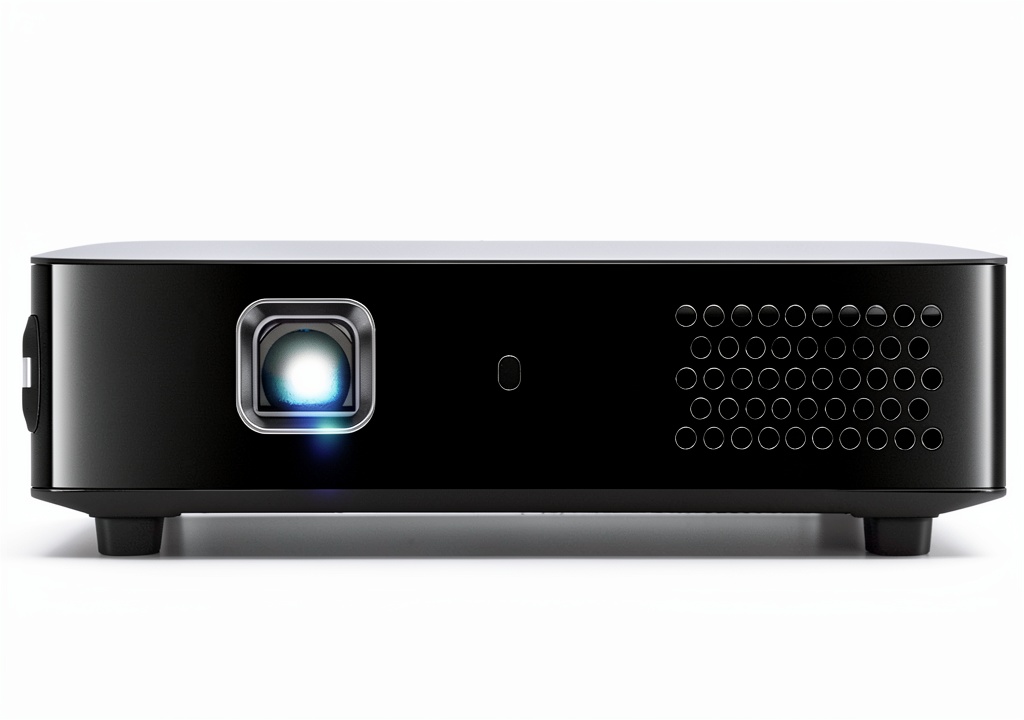
Unboxing the M200S, the first thing you notice is its surprisingly compact footprint—roughly the size of a large hamburger. The white plastic housing feels durable enough for casual transport but doesn’t have the premium heft of more expensive models like the Anker Nebula Capsule. The lens positioning and control layout are logically arranged, with physical buttons for power, source selection, and menu navigation.
What matters in real use: The compact design genuinely makes it throw-in-your-bag portable, but the lightweight construction means it’s susceptible to being knocked out of alignment if bumped. I found placing it on a stable surface crucial for maintaining image positioning.
Performance in Real Use
Image quality is where budget projectors typically compromise, and the M200S is no exception. In complete darkness, the projected image delivers surprisingly vibrant colors and acceptable sharpness at sizes up to 80 inches. Beyond that, pixelation becomes noticeable. The claimed HD support means it accepts 1080p signals but displays them at its native 854×480 resolution.
Where this projector genuinely struggles is in anything but pitch-black conditions. Even moderate ambient light significantly washes out the image. During testing, I attempted a late afternoon viewing with curtains drawn and found the image lacked the punch needed for comfortable viewing.
The automatic keystone correction works adequately for minor angle adjustments but can introduce slight image softening. Manual positioning remains the better option for optimal clarity.
Ease of Use
Setup is straightforward—power on, select your input source, and you’re projecting within minutes. The wireless screen mirroring functioned reliably with both iOS and Android devices during my tests, though there was occasional latency when scrolling through content.
The SYNQ TV interface provides basic streaming app access but has notable limitations. Services like Netflix require separate subscriptions and may have content restrictions compared to their native apps. During testing, I found the interface responsive but less polished than mainstream streaming platforms.
Real usage scenario: I set up the M200S for a backyard movie night with friends. The battery lasted through a 1 hour 45 minute film with about 15% remaining. The wireless connection from my phone worked flawlessly for YouTube content, but when attempting to mirror Netflix from another device, I encountered DRM restrictions that required using the built-in SYNQ app instead.
Audio Performance
The built-in 3W speaker delivers adequate volume for personal viewing or small groups in quiet environments, but it lacks bass response and clarity at higher volumes. For anything beyond casual viewing, the 3.5mm audio output becomes essential. During testing, connecting to a portable Bluetooth speaker via an adapter significantly enhanced the audio experience.
Battery Life & Portability
The claimed 2-hour battery life proved accurate during my testing with mixed content streaming. This covers most feature films but leaves little margin for error. What few reviews mention is that battery duration varies significantly based on brightness settings and audio volume.
Real usage scenario: As a presentation tool for client meetings, the M200S excelled in conference rooms with controlled lighting. The battery provided enough runtime for back-to-back presentations without hunting for power outlets. The compact size made transport between meetings effortless compared to bulkier alternatives.
Pros & Cons
Pros:
- Genuinely portable with all-in-one design
- Wireless screen mirroring works reliably for most content
- Built-in streaming app reduces immediate need for external devices
- Vibrant color reproduction in dark environments
- Straightforward setup process for beginners
Cons:
- Limited brightness struggles with ambient light
- Built-in speaker lacks depth and volume
- Streaming app has content limitations and requires separate subscriptions
- Battery life may not cover longer viewing sessions
- Native resolution falls short of true HD clarity
Comparison & Alternatives
Cheaper Alternative: Generic Budget Projectors ($50-70)
Numerous unbranded projectors populate Amazon’s sub-$70 range. While cheaper upfront, these typically lack built-in batteries, have inferior color accuracy, and offer questionable longevity. The M200S justifies its premium through reliability and the convenience of an integrated battery and streaming platform.
When to choose the cheaper option: Only if you’re experimenting with projection technology for the first time and don’t mind potential quality and reliability trade-offs.
Premium Alternative: Anker Nebula Capsule 3 ($300-400)
The Capsule 3 represents the next tier in portable projectors, offering true 1080p resolution, Android TV with full Google Play Store access, brighter output, and more robust construction. The price premium buys you significantly better image quality, more streaming options, and generally better performance in less-than-ideal lighting.
When to choose the premium option: If you plan to use your projector regularly, want true HD clarity, need better brightness for non-dark environments, or want seamless access to streaming services without workarounds.
Buying Guide / Who Should Buy
Best for Beginners
First-time projector users will appreciate the M200S’s straightforward operation and all-inclusive approach. You don’t need to understand technical specifications or purchase additional accessories to start projecting. The automatic features and simple interface lower the entry barrier significantly.
Best for Professionals
Business users needing a portable presentation tool will find the M200S adequate for small to medium conference rooms. The wireless capabilities eliminate cable clutter, while the built-in battery provides flexibility in spaces with limited power access. Just ensure your presentation environments have controllable lighting.
Not Recommended For
Serious home theater enthusiasts should look elsewhere. The brightness limitations and resolution cap make it unsuitable for dedicated entertainment spaces. Similarly, frequent travelers wanting to watch Netflix content seamlessly may find the SYNQ TV limitations frustrating without additional streaming devices.
FAQ
Can I watch Netflix directly on the Miroir M200S?
Yes, but through the built-in SYNQ TV app rather than the native Netflix application. This requires a separate Netflix subscription and may have some content differences compared to the standard interface. Wireless mirroring of Netflix from mobile devices typically encounters DRM restrictions.
How does the battery life hold up in real use?
In testing, the battery consistently delivered 1.5-2 hours depending on brightness settings and content type. This covers most feature films but requires planning for longer viewing sessions. The projector can operate while charging, but this somewhat defeats the cord-free convenience.
Is the image quality good enough for movie nights?
In completely dark environments, the image quality is surprisingly good for the price point, with vibrant colors and acceptable sharpness at sizes up to 80 inches. However, any ambient light significantly diminishes the viewing experience, making it unsuitable for rooms with uncontrolled lighting.
What’s the real difference between supporting 1080p and native 1080p?
The M200S accepts 1080p input signals but downscales them to its native 854×480 resolution for display. This means you get compatibility with HD sources but not true HD clarity. The difference becomes noticeable on text and fine details, especially at larger screen sizes.
Is the Miroir M200S worth buying in 2026?
For under $100, the M200S delivers legitimate value if your expectations align with its capabilities. It’s best viewed as a convenient portable entertainment tool rather than a home theater replacement. If you primarily need dark-room viewing of casual content and value portability above premium features, it represents a sensible choice. If you demand true HD quality, brighter output, or seamless streaming integration, investing in a higher-tier model makes more sense.