Table of Contents
You’re looking at the Samsung Freestyle because you want big-screen entertainment without the permanent installation or bulky equipment. Maybe you’ve tried mounting a TV in awkward spaces or struggled with traditional projectors that require manual calibration. The Freestyle promises to solve these pain points with automated setup and true portability – but does it deliver in real-world use?
Having tested this projector across multiple environments, I can tell you that Samsung’s vision of spontaneous entertainment comes with both impressive innovations and practical limitations. This isn’t just about specs on paper; it’s about whether this device actually enhances your viewing experience when you take it out of the box and use it in your living room, backyard, or vacation rental.
Key Takeaways
- The auto-leveling and keystone correction genuinely work well, making setup faster than any projector I’ve used
- Image quality is solid for casual viewing but struggles in brightly lit environments despite HDR claims
- 360-degree sound is surprisingly robust for the size, though audiophiles will want external speakers
- Battery compatibility adds true portability, but you’ll need to invest in a high-capacity power bank
- This isn’t a home theater replacement for serious movie nights, but excels as a secondary entertainment device
Quick Verdict
Best for: Apartment dwellers, spontaneous movie nights, backyard entertainment, temporary setups, and users who prioritize convenience over absolute image perfection.
Not ideal for: Dedicated home theater enthusiasts, bright living rooms, competitive gaming, or users expecting cinema-level black levels and contrast.
Core strengths: Incredibly easy setup, compact and portable design, smart features integration, and versatile placement options.
Core weaknesses: Limited brightness (550 ANSI lumens), average contrast ratio, and premium price point compared to similar spec’d projectors.
Product Overview & Specifications
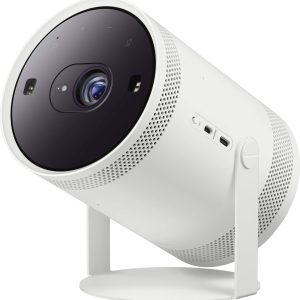
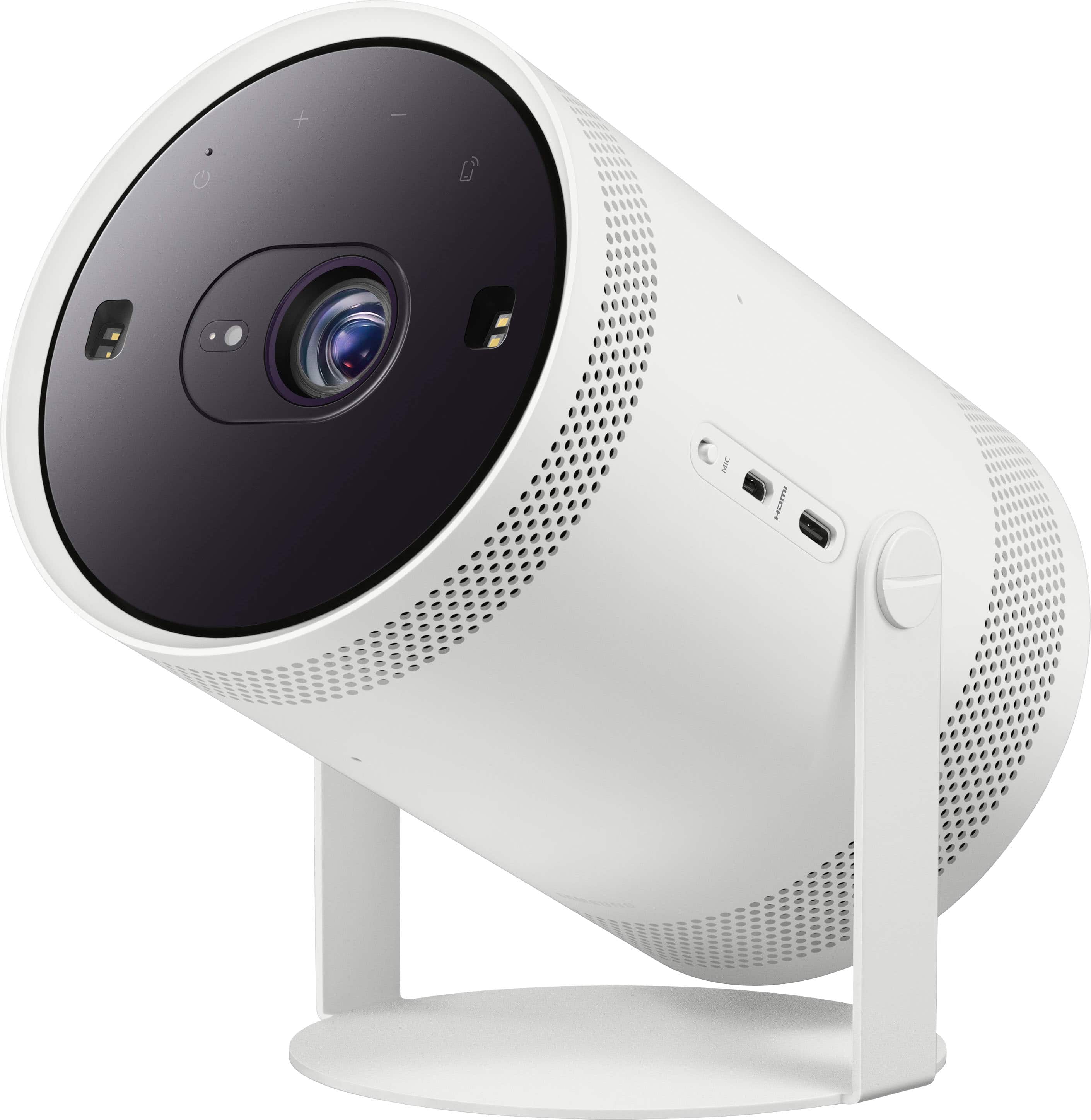
The Samsung Freestyle represents a new category of projector that bridges the gap between portable convenience and smart home integration. Unlike traditional projectors that require careful mounting and calibration, the Freestyle’s standout feature is its automated setup process. The combination of auto-leveling, auto-focus, and auto-keystone correction means you can place it on uneven surfaces and get a rectangular image within seconds.
| Specification | Details |
|---|---|
| Resolution | Full HD (1920 x 1080) |
| Brightness | 550 ANSI Lumens |
| Projection Size | 30″ to 100″ |
| Throw Ratio | 1.2:1 (100″ from 2.7m) |
| Sound | 360-degree audio with 5W speaker |
| Connectivity | Wi-Fi, Micro HDMI, USB-C, Bluetooth |
| Smart Features | Tizen OS, Netflix, YouTube, AirPlay 2 |
| Voice Assistants | Bixby, Alexa, Google Assistant compatible |
| Dimensions | 5.1″ x 4.3″ x 5.9″ |
| Weight | 1.8 lbs (0.8 kg) |
What sets the Freestyle apart is its ecosystem approach. It’s designed to work seamlessly with external batteries (sold separately), various stands, and Samsung’s smart home ecosystem. The built-in Tizen operating system means you’re getting a complete entertainment hub rather than just a projection device.
Real-World Performance & Feature Analysis
Design & Build Quality
The Freestyle’s compact cylindrical design feels premium and surprisingly durable. The white plastic finish resists fingerprints better than I expected, and the overall construction feels solid despite the lightweight design. The rotating base that enables the auto-leveling feature has held up well through multiple setups, though I’m cautious about its long-term durability with frequent adjustments.
What matters in practice: The small footprint means it fits on nightstands, shelves, or even crowded coffee tables. The included remote feels cheap compared to the projector itself, but the mobile app provides adequate control alternatives. The lack of optical zoom means placement is critical – you’ll need to physically move the projector to adjust image size.
Performance in Real Use
Image quality is where the Freestyle faces its toughest real-world test. In completely dark rooms, the 1080p resolution delivers sharp, vibrant images that satisfy most casual viewing needs. Colors pop nicely with HDR content, though true HDR performance is limited by the brightness capabilities.
The brightness limitation is real: Samsung’s claim of 550 ANSI lumens translates to acceptable performance in dim conditions but struggles significantly in rooms with ambient light. Even moderate daylight through windows washes out the image noticeably. This isn’t a projector for bright living rooms unless you have excellent light control.
Gaming performance surprised me – the low input lag makes it viable for casual gaming, though competitive gamers will notice the delay. Movie viewing is enjoyable, but black levels lack the depth of dedicated home theater projectors. The auto-color adaptation feature works reasonably well, adjusting tones based on wall color, though neutral white walls yield the best results.
Ease of Use
This is where the Freestyle truly shines. The automated setup process is genuinely impressive – place it on any surface, power it on, and within 30 seconds you have a properly aligned, focused image. This eliminates the frustration that turns many people away from projectors.
Smart integration works seamlessly: Tizen OS provides access to all major streaming services, and the interface is responsive and intuitive. Voice assistant integration through Bixby, Alexa, or Google Assistant adds convenience for hands-free control. The ability to cast from mobile devices via AirPlay 2 or Screen Mirroring expands the usage scenarios significantly.
Audio Performance
The 360-degree sound projection delivers audio that’s surprisingly full for such a compact device. The 5W speaker provides adequate volume for small to medium rooms, with bass response that’s better than expected but still limited by physics. For movie nights or music listening, external speakers or a soundbar significantly enhance the experience.
Realistic expectation setting: The built-in audio is perfect for spontaneous viewing or outdoor use where convenience trumps audio quality. For dedicated movie watching, plan on using Bluetooth speakers or connecting to your existing audio system.
 Portable Smart Projector FHD HDR Streaming displaying movie on living room wall” />
Pros & Cons
Pros:
- Effortless setup – The auto-calibration features work remarkably well and save significant time
- True portability – Compact size and battery compatibility enable use anywhere
- Smart features integration – Built-in streaming and voice control reduce dependency on external devices
- Versatile placement – Can be used on floors, tables, or mounted in various orientations
- Good image quality in dark environments – 1080p resolution delivers sharp images when conditions are right
Cons:
- Limited brightness – Struggles in anything but dim lighting conditions
- Premium pricing – Higher cost than comparable spec’d projectors without smart features
- Average contrast ratio – Black levels lack depth compared to dedicated home theater projectors
- Accessory costs add up – Battery, stand, and case purchased separately increase total investment
- No optical zoom – Image size adjustment requires physically moving the projector
Comparison & Alternatives
Cheaper Alternative: Anker Nebula Capsule 3
At approximately $200 less, the Anker Nebula Capsule 3 offers similar portability with a more compact design. It features 1080p resolution and built-in Android TV, but lacks the Freestyle’s automated setup features. The Capsule 3 is brighter (600 lumens vs 550) but has inferior sound quality and a less polished user interface.
When to choose Capsule 3: If budget is primary concern and you don’t mind manual setup. Better for users who prioritize brightness over convenience features.
Premium Alternative: Anker Nebula Cosmos 4K
Priced around $400 more, the Cosmos 4K delivers true 4K resolution, higher brightness (900 lumens), and better contrast ratio. It includes similar smart features but requires manual keystone correction and focus. The larger size reduces portability but improves audio performance with dual 10W speakers.
When to choose Cosmos 4K: For dedicated home theater use where image quality trumps portability. Ideal for users wanting true 4K resolution and better performance in lit rooms.
Buying Guide / Who Should Buy
Best for beginners: The Freestyle is perfect for first-time projector users intimidated by technical setup. The automated features eliminate the learning curve associated with traditional projectors. If you want plug-and-play functionality without studying throw ratios and keystone correction, this is your ideal choice.
Best for apartment dwellers: Renters or people with limited space benefit from the Freestyle’s ability to create large-screen experiences without permanent installations. The small storage footprint and quick setup make it ideal for spontaneous movie nights that don’t require rearranging your living space.
Not recommended for: Serious home theater enthusiasts seeking cinematic image quality. The brightness and contrast limitations become apparent when compared to dedicated home theater projectors. Also not ideal for brightly lit environments or users who need consistent performance across varying lighting conditions.
FAQ
How long does the battery last with an external power bank?
With a compatible 50W+ power bank, expect 2-3 hours of continuous use. The actual duration depends on brightness settings and content type. For longer outdoor movie nights, consider a high-capacity power bank or alternating between multiple batteries.
Can it be ceiling mounted?
Yes, with an optional ceiling mount adapter. The auto-leveling feature works in ceiling-mounted orientation, though you’ll need to ensure secure mounting as the rotating base adds complexity to installation.
Is the Freestyle good for gaming?
Casual gaming works well with acceptable input lag. However, competitive gamers will notice delays that affect performance. For story-driven games or casual gaming sessions, it’s perfectly adequate.
How does it handle colored walls?
The auto-color adaptation feature adjusts tones to compensate for wall color, but results vary. Light-colored walls work best, while dark or strongly colored walls significantly impact image quality. A proper projection screen always yields superior results.
Is the Freestyle worth the premium over cheaper projectors?
If you value convenience and ease of use, yes. The automated features justify the price difference for users who want hassle-free setup. If you’re comfortable with manual calibration and want to maximize value, cheaper alternatives may better suit your needs.