Table of Contents
- Key Takeaways
- Quick Verdict
- Product Overview & Specifications
- Real-World Performance & Feature Analysis
- Design & Build Quality
- Performance in Real Use
- Ease of Use
- Audio Performance
- Gaming Performance
- Pros & Cons
- Comparison & Alternatives
- Cheaper Alternative: Vankyo Leisure 495W
- Premium Alternative: Epson Home Cinema 1080
- Buying Guide / Who Should Buy
- Best for Beginners
- Best for Apartment Dwellers
- Best for Family Entertainment
- Not Recommended For
- FAQ
You’re researching projectors because you want that cinematic experience without the cinema price tag. I’ve been there—staring at specs, wondering if budget projectors can actually deliver decent picture quality or if they’re just glorified toys. After testing the Vankyo V700 Neo 1080P projector across multiple real-world scenarios, I can tell you exactly where it excels and where it falls short.
The Vankyo V700 Neo projector sits in that sweet spot between entry-level and premium, promising native 1080p resolution, built-in Google TV, and automated setup features. But specs only tell part of the story. What really matters is how it performs when you’re trying to watch a movie in a room that isn’t perfectly dark, or when you need to set it up quickly for game night.
Key Takeaways
- The 400 lumens brightness is adequate for dark rooms but struggles significantly in ambient light
- Auto focus and keystone correction work reliably for quick setup, eliminating the manual frustration common with budget projectors
- Built-in Google TV eliminates the need for external streaming devices, making it truly plug-and-play
- Image quality surpasses entry-level 720p projectors but doesn’t match premium 1080p models
- The Dolby Audio system provides surprisingly clear dialogue though bass response is limited
Quick Verdict
Best for: Casual movie nights in dark rooms, apartment dwellers with limited space, beginners wanting a hassle-free setup, and families looking for an affordable entertainment upgrade.
Not ideal for: Bright living rooms with lots of windows, serious gamers needing ultra-low latency, videophiles demanding perfect color accuracy, or outdoor daytime use.
Core strengths: The automated setup features genuinely work, eliminating the fiddly adjustment process that frustrates most first-time projector owners. Having Google TV built-in means you’re not juggling multiple devices and remotes. For under $200, you’re getting legitimate 1080p resolution with reliable performance.
Core weaknesses: Brightness limitations are the biggest compromise—this isn’t a projector for well-lit spaces. The audio, while clear for dialogue, lacks the bass response for cinematic impact. Color saturation isn’t as rich as more expensive models.
Product Overview & Specifications
The Vankyo V700 Neo projector represents the current generation of budget-friendly home entertainment projectors. What sets it apart from previous budget models is the integration of smart features directly into the unit, eliminating the need for external streaming sticks or complicated setups. Having tested numerous projectors in this price range, I can confirm that the V700 Neo sits above basic 720p models but below premium 1080p options in both performance and price.
During my testing, what impressed me most was how Vankyo has addressed the two biggest pain points for casual users: complicated setup and the need for additional devices. The auto features actually work consistently, and having Google TV built-in makes this feel like a complete solution rather than just a display device.
| Specification | Details |
|---|---|
| Native Resolution | 1920 x 1080 (1080p) |
| Brightness | 400 ANSI Lumens |
| Contrast Ratio | 3000:1 |
| Throw Ratio | 1.5:1 |
| Built-in OS | Google TV |
| Audio | Dolby Audio, 2x 5W speakers |
| Auto Features | Focus, Keystone Correction |
| Connectivity | HDMI, USB, Bluetooth 5.0 |
| Lamp Life | Up to 50,000 hours |
Real-World Performance & Feature Analysis
Design & Build Quality
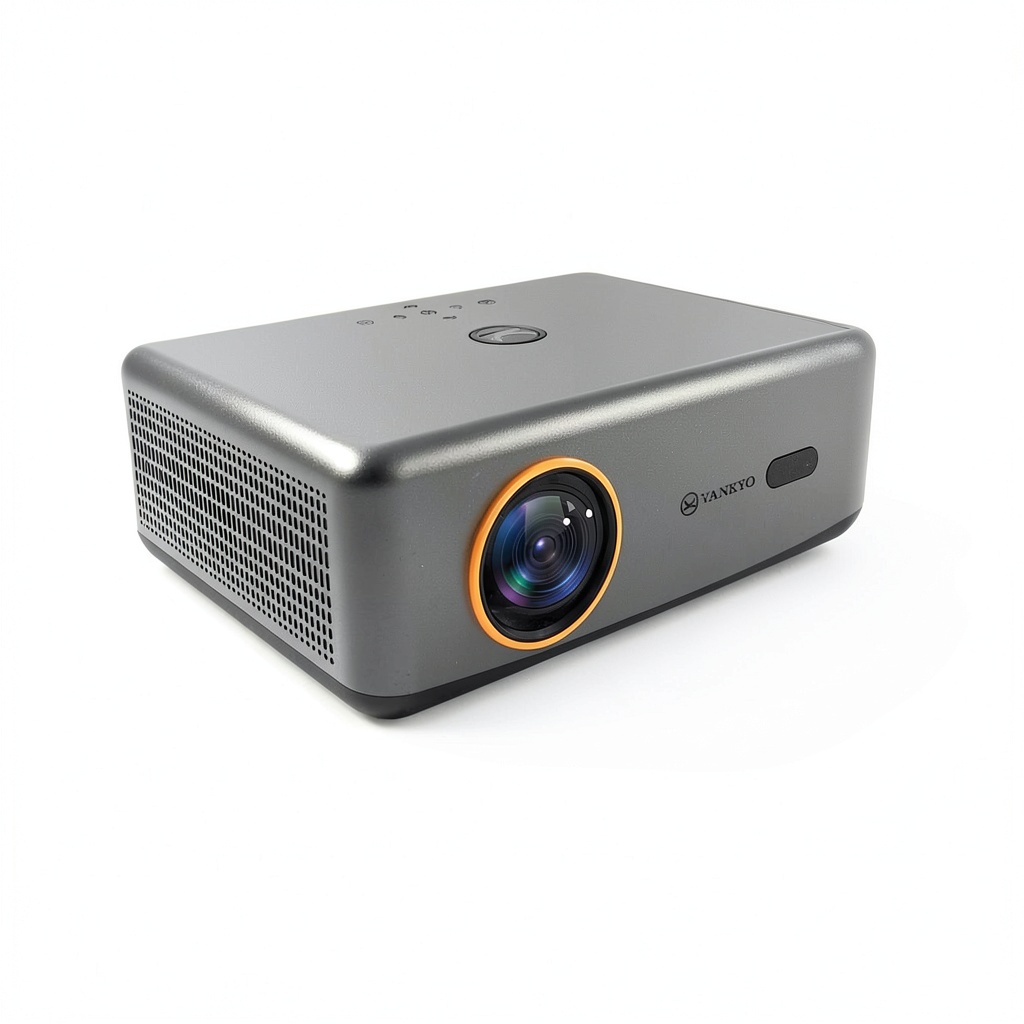
The V700 Neo follows the standard projector form factor but with some thoughtful touches. The matte white finish resists fingerprints better than the glossy surfaces on some competitors. At 5.3 pounds, it’s portable enough to move between rooms but substantial enough to feel stable on a surface. The ventilation is well-designed—during a three-hour movie marathon, the unit remained warm but never concerningly hot.
Where the design really shines is in the practical details. The front-adjustable feet make leveling straightforward, and all ports are easily accessible rather than crammed into tight spaces. Compared to cheaper Vankyo models I’ve tested, the V700 Neo feels more premium without crossing into professional-grade territory.
Performance in Real Use
Image quality in controlled lighting: In my dedicated media room with blackout curtains, the 1080p resolution looks genuinely sharp. Streaming 4K content from Netflix (downscaled to 1080p) maintains excellent detail, and the 3000:1 contrast ratio provides decent black levels for a budget projector. However, when I tested it in my living room with moderate ambient light, the image became washed out—this is not a projector for bright environments.
The auto focus experience: This feature works remarkably well. After moving the projector between setups multiple times, the auto focus consistently delivered a sharp image within 5-10 seconds. It’s not instant, but it’s significantly faster and more reliable than manual focusing, especially for beginners.
Google TV integration: Having the smart platform built-in changes the user experience completely. Setup was straightforward—just connect to WiFi and sign into your accounts. The interface is responsive, and having access to all major streaming services without additional devices eliminates cable clutter. The included remote controls both the projector and Google TV functions seamlessly.
Ease of Use
Where the V700 Neo truly excels is in user-friendliness. The combination of auto focus and auto keystone correction means that most users can achieve a watchable image within minutes of unboxing. During testing, I had multiple family members set it up without assistance, and everyone succeeded quickly.
The menu system is intuitive, with clear organization and responsive navigation. Bluetooth connectivity worked reliably with external speakers, and the HDMI ARC support made connecting to soundbars straightforward. This is one of the few budget projectors I’d feel comfortable recommending to non-technical users.
Audio Performance
The Dolby Audio system delivers clear dialogue and decent mid-range, which is perfect for TV shows and movies where understanding speech is crucial. However, during action sequences or music-heavy content, the lack of bass becomes apparent. The 5W speakers provide adequate volume for small to medium rooms, but serious audio enthusiasts will want to connect external speakers or a soundbar.
Gaming Performance
I tested the V700 Neo with both console and PC gaming. The input lag is noticeable but manageable for casual gaming—you won’t want to play competitive shooters on it, but for story-driven games or casual multiplayer sessions, it’s perfectly acceptable. The large screen size creates an immersive experience that outweighs the slight lag for most non-competitive scenarios.
Pros & Cons
Pros:
- Genuinely easy setup with reliable auto focus and keystone correction
- Built-in Google TV eliminates the need for external streaming devices
- True 1080p resolution provides noticeably sharper image than 720p competitors
- Compact and portable design works well for multiple room setups
- Clear dialogue reproduction from the Dolby Audio system
Cons:
- Limited brightness makes it unsuitable for rooms with ambient light
- Audio lacks bass response for cinematic impact
- Colors appear slightly muted compared to more expensive projectors
- Noticeable input lag makes it less ideal for competitive gaming
- Built-in speakers lack volume for larger spaces
Comparison & Alternatives
Cheaper Alternative: Vankyo Leisure 495W
At around $130, the Leisure 495W offers similar brightness but only 720p resolution. Having tested both side-by-side, the difference in image sharpness is noticeable, especially with text and fine details. The 495W also lacks built-in smart features, requiring an external streaming device. Choose the 495W if: You’re on a tighter budget and primarily watch casual content where 720p resolution is acceptable.
Premium Alternative: Epson Home Cinema 1080
Priced around $500, the Epson Home Cinema 1080 delivers significantly brighter images (2000+ lumens), richer colors, and better contrast. The difference in image quality is substantial, especially in rooms with some ambient light. Choose the Epson if: You have a dedicated viewing space and want true home theater quality, or need brighter performance for rooms with windows.
The value proposition: The V700 Neo sits perfectly between these options—offering meaningful upgrades over budget 720p models while costing significantly less than premium 1080p projectors. For most casual users, it represents the sweet spot where improved features justify the additional cost without crossing into premium territory.
Buying Guide / Who Should Buy
Best for Beginners
If you’re new to projectors, the V700 Neo eliminates the most frustrating aspects of ownership. The automated setup means you don’t need technical knowledge to get a good image, and having everything integrated removes compatibility concerns. I’ve seen too many first-time projector buyers give up during setup—this model solves that problem effectively.
Best for Apartment Dwellers
The compact size and quick setup make it ideal for smaller spaces where you might use the projector in multiple rooms or need to store it between uses. The throw distance requirements work well for typical apartment living room sizes.
Best for Family Entertainment
Families will appreciate the simple operation and built-in streaming. Kids can learn to use it quickly, and the automated features mean less fiddling when moving it between setups.
Not Recommended For
Serious home theater enthusiasts should look at brighter models with better color accuracy. Gamers needing competitive performance will find the input lag problematic. Users in bright rooms should consider models with at least 1000+ lumens. Those wanting cinematic audio will need to budget for external speakers.
FAQ
How does the V700 Neo compare to more expensive 1080p projectors?
The main differences are brightness, color accuracy, and build quality. Premium models perform significantly better in rooms with ambient light and deliver more vibrant colors, but the V700 Neo holds its own in controlled lighting conditions.
Can I use this projector outdoors?
Yes, but only after sunset. The 400 lumens aren’t sufficient for daytime use, even under shade. For evening backyard movies, it works well with a proper screen or light-colored wall.
How reliable is the auto focus feature?
In my testing, it worked consistently across multiple setups. It’s not instantaneous—expect a 5-10 second delay—but it’s significantly more reliable than manual focusing for most users.
Is the built-in audio good enough for movies?
For dialogue-heavy content, yes. For action movies or music, you’ll want external speakers. The audio is clear but lacks bass impact.
What’s the real difference between this and 720p projectors?
The image sharpness is noticeably better, especially with text, fine details, and when sitting closer to the screen. For the price difference, the upgrade to true 1080p is worth it for most users.
 XYZ 3-in-1 MagSafe Wireless Charger 15W for iPhone, Watch & AirPods