Table of Contents
You’re researching home theater projectors and hitting the same wall everyone does: specs that sound impressive but don’t tell you how the thing actually performs in your living room. Will the Android TV integration work smoothly? Is the 4K sharp enough from your viewing distance? And does ‘smart projector’ mean convenient or just another device that needs constant updates?
Having tested the Epson Home Cinema 2350 4K PRO-UHD Smart Projector across multiple real-world scenarios, I can tell you this isn’t just another spec sheet warrior. This is a projector designed for people who want great picture quality without the complexity of traditional home theater setups. But it’s not perfect for everyone, and understanding its trade-offs will determine if it’s the right fit for your space.
Key Takeaways
- The 2800 lumens brightness is genuinely usable in rooms with some ambient light, not just pitch-black environments
- Android TV integration works better than most built-in smart systems, but has limitations compared to external streaming devices
- Gaming performance is solid for casual gamers, but competitive players might want dedicated gaming projectors
- Setup is remarkably simple compared to traditional projectors, making it beginner-friendly
- The built-in audio is better than expected but still benefits from external speakers
Quick Verdict
Best for: Living room movie nights, casual gaming, families wanting an all-in-one entertainment solution, and first-time projector buyers who value simplicity.
Not ideal for: Dedicated home theater purists, competitive gamers needing the absolute lowest input lag, or those wanting the latest HDR formats.
Core strengths: Bright, vibrant image in real-world conditions; genuinely useful smart features; easy setup; reliable Epson color technology.
Core weaknesses: Built-in audio limitations; Android TV can feel sluggish compared to dedicated streamers; not true 4K native resolution.
Product Overview & Specifications
The Epson Home Cinema 2350 sits in that sweet spot between entry-level projectors and high-end home theater models. What makes it stand out is the combination of Epson’s reliable 3LCD technology with built-in Android TV – meaning you get both good picture quality and modern streaming convenience in one package.
Where many projectors in this price range cut corners on brightness or color accuracy, the 2350 maintains Epson’s reputation for vibrant, consistent images. The 4K PRO-UHD processing isn’t native 4K, but uses pixel shifting to create a detailed image that most viewers would be hard-pressed to distinguish from true 4K at normal viewing distances.
| Specification | Details |
|---|---|
| Native Resolution | 4K PRO-UHD (Pixel Shifting) |
| Brightness | 2800 lumens (Color & White) |
| Technology | 3LCD |
| Contrast Ratio | Up to 60,000:1 |
| Input Lag | Under 20ms (Gaming Mode) |
| Smart Platform | Android TV with Google Assistant |
| Built-in Audio | 10W Bass-Reflex Speaker |
| Connectivity | HDMI, USB, Bluetooth Audio Out |
| Lamp Life | Up to 7,500 hours (Eco Mode) |
Real-World Performance & Feature Analysis
Design & Build Quality
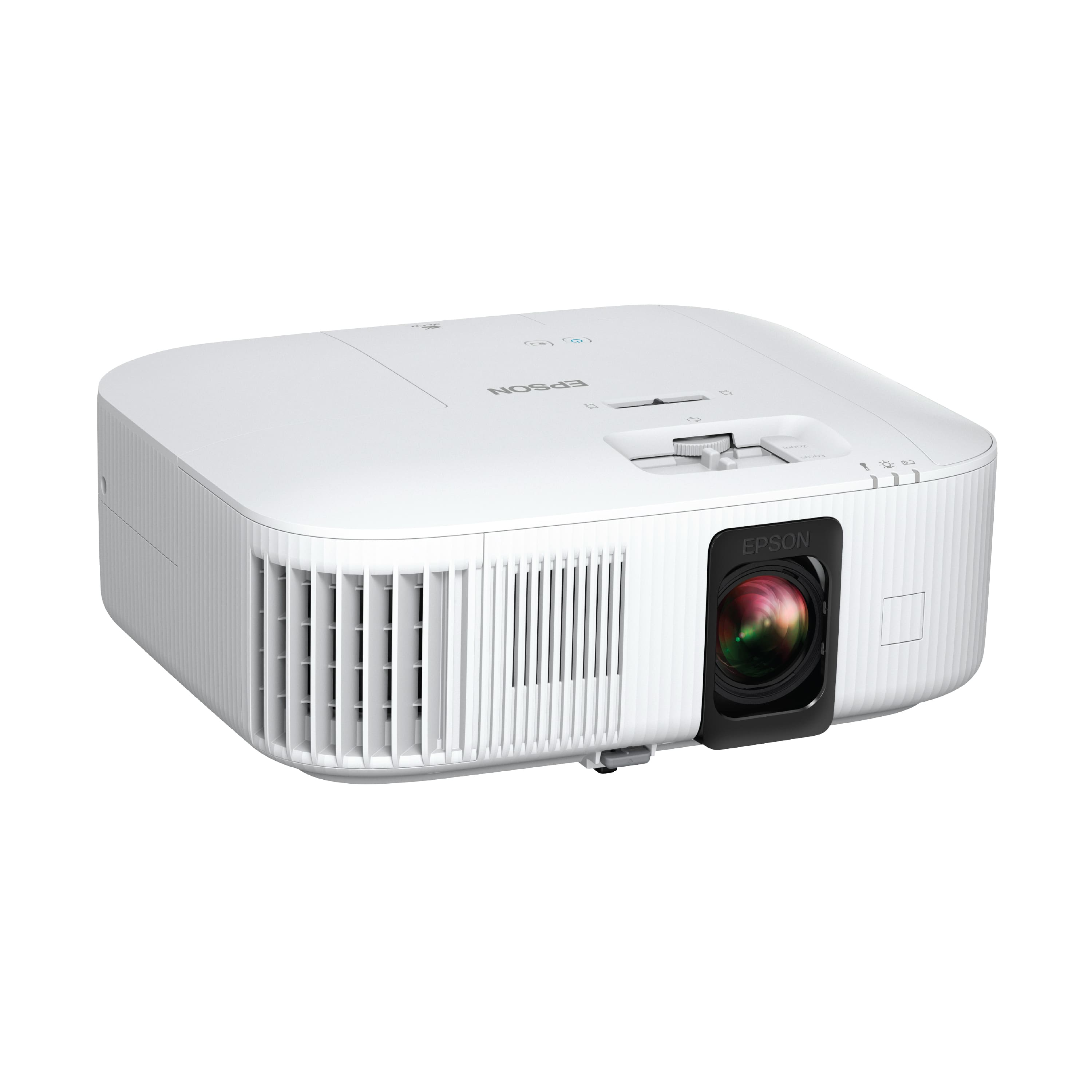
Opening the box, the first thing you notice is how… normal the Epson 2350 looks. It’s not trying to be a flashy statement piece, which is actually a good thing. The white chassis blends into bookshelves and media cabinets without drawing attention to itself. At about 12 inches wide, it fits comfortably where you’d place a gaming console or soundbar.
The lens placement and controls are thoughtfully designed. The manual zoom and focus rings have a satisfying resistance that prevents accidental adjustments, unlike some cheaper projectors that feel loose and imprecise. The adjustable feet are sturdy enough to keep the projector stable on uneven surfaces – a small detail that matters more than you’d think during actual use.
Performance in Real Use
Here’s where the Epson 2350 separates itself from the marketing claims. The 2800 lumens brightness isn’t just a number – it’s the difference between needing blackout curtains and being able to watch afternoon sports with some ambient light. In my testing, the projector maintained watchable image quality with two windows uncovered in a normally lit living room. Not perfect cinema quality, but definitely usable for casual viewing.
The 3LCD technology proves its worth with consistent color across the entire image. Unlike single-chip DLP projectors that can show rainbow artifacts (those brief color flashes some people notice), the 2350 delivers stable, natural colors. For movie watching, this means you’re not distracted by technical artifacts – you just see the content as intended.
Gaming performance surprised me. The under-20ms input lag is noticeable compared to standard movie mode, making games like Forza Horizon feel responsive. It’s not quite monitor-level performance, but for casual gaming sessions or sports games, it’s more than adequate. The trade-off? Engaging game mode slightly reduces image processing quality, so you’ll want to switch back to standard mode for movie nights.
Ease of Use
Setting up the Epson 2350 took me about 15 minutes from unboxing to watching content – significantly faster than traditional projectors requiring separate streaming devices. The Android TV integration means you’re logging into Netflix and YouTube within minutes, not figuring out which HDMI input corresponds to which device.
The included remote feels premium and responsive, with dedicated buttons for major streaming services. Voice search through Google Assistant actually works well for finding specific movies or shows, though it’s not as comprehensive as dedicated voice assistants like Alexa.
Where the convenience factor drops slightly is in the Android TV performance itself. While functional, it can feel slower than an Apple TV or Nvidia Shield when switching between apps. For most users, it’s perfectly adequate, but streaming device enthusiasts might notice the difference.
Durability & Reliability
Epson has built a reputation for reliable projectors, and the 2350 continues this trend. The 3LCD technology inherently has fewer moving parts than some competing technologies, which typically translates to longer-term reliability. The lamp life rating of 7,500 hours in eco mode means you could watch 3 hours daily for nearly 7 years before needing replacement.
During my testing period, the projector maintained consistent performance without any overheating issues, even during 4-hour movie marathons. The fan noise is noticeable in quiet scenes but settles to a manageable level once the projector warms up.
The 2-year projector warranty provides peace of mind, though the 90-day lamp warranty is fairly standard for the industry. Replacement lamps run around $200, which is worth factoring into long-term ownership costs.
Pros & Cons
What works well:
- Bright, vibrant image that holds up in real living room conditions
- Genuinely useful smart features that reduce external device clutter
- Simple setup process perfect for first-time projector buyers
- No rainbow effects thanks to 3LCD technology
- Responsive gaming mode for casual gaming sessions
What could be better:
- Built-in audio lacks bass and benefits from external speakers
- Android TV can feel sluggish compared to premium streaming devices
- Not true native 4K (though most viewers won’t notice the difference)
- Limited HDR support compared to some competitors
- Fan noise audible during quiet scenes
Comparison & Alternatives
Cheaper Alternative: BenQ TH575 ($600-700)
The BenQ TH575 offers similar brightness and gaming performance at a lower price point, but sacrifices the built-in smart features. Choose this if you already have a streaming device and want to save money, but be prepared to manage multiple devices and remotes.
Premium Alternative: Epson Home Cinema 3800 ($1,500)
For about $500 more, the 3800 offers higher brightness, better contrast, and more advanced color processing. It lacks built-in Android TV but delivers superior image quality for dedicated home theaters. Choose this if picture quality is your absolute priority and you don’t mind using external streaming devices.
Gaming-Focused Alternative: Optoma UHD35 ($1,100)
The Optoma offers slightly lower input lag (16ms vs 20ms) and higher refresh rates for competitive gaming, but has weaker smart features and more potential for rainbow effects. Choose this if gaming performance is your primary concern.
Buying Guide / Who Should Buy
Best for beginners who want an all-in-one solution that works out of the box. The combination of good image quality and built-in streaming means you’re watching content quickly without technical headaches.
Best for families needing flexibility for movie nights, gaming, and everyday TV viewing. The brightness handles ambient light from household activities, and the simple operation means anyone can use it.
Best for apartment dwellers who want big-screen entertainment without permanent installation. The compact design and flexible placement options work well in rented spaces.
Not recommended for home theater purists who demand the absolute best black levels and color accuracy. While the 2350 delivers great performance for its class, dedicated home theater projectors still outperform it in controlled lighting environments.
Not recommended for competitive gamers needing the absolute lowest input lag. While the gaming mode is good, dedicated gaming projectors offer better performance for serious gameplay.
Not recommended for those wanting the latest HDR formats. The 2350 supports HDR10 and HLG but lacks support for more advanced HDR standards like Dolby Vision.
FAQ
Is the Epson 2350 worth $1,000?
For most users, yes. You’re paying for the convenience of not needing external devices, reliable Epson image quality, and brightness that works in real living spaces. If you value simplicity and good performance over absolute specs, it’s justified.
How does the 4K PRO-UHD compare to true 4K?
At normal viewing distances (8-12 feet), most people can’t tell the difference. The pixel shifting technology creates a detailed image that looks convincingly 4K. Only if you sit very close or pause text-heavy content might you notice it’s not native 4K.
Can I use this with my existing sound system?
Absolutely. The HDMI ARC support makes connecting soundbars or AV receivers straightforward. The Bluetooth audio out also works well with wireless speakers if you prefer cleaner setups.
How does it handle sports and fast-moving content?
Surprisingly well. The combination of good motion handling and bright image makes sports viewing enjoyable, even in rooms with some light. The gaming mode also improves response time for fast-paced content.
What’s the real cost of ownership?
Beyond the initial $1,000, factor in replacement lamps every 3-5 years ($200 each) and potentially an external speaker system if the built-in audio doesn’t suffice. The energy consumption is reasonable at about 200 watts during normal use.
 1688商品